Amazing Screenshot and Annotate Tool

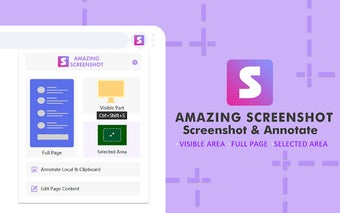
Amazing Screenshot & Annotate Tool is a free Chrome extension developed by extfun. It is a simple and efficient screenshot capture tool that also provides annotation functions. With just one click, users can easily capture screenshots and annotate them.

This tool meets the requirements for high-quality and high-resolution screenshots, supporting PNG, JPG, and PDF formats. It offers built-in rich annotation tools, allowing users to easily edit their screenshots. Additionally, it can be used as a graffiti tool to edit web content as desired.

The screenshot function includes the ability to capture specific areas, the entire page, or just the visible area. It also supports saving screenshots in PNG, JPG, and PDF formats, and provides convenient screen capture keyboard shortcuts.

The screen shot annotation function enables users to write text, obfuscate sensitive information, use arrows and stickers, add rectangular boxes or lines, crop pictures, and insert images. Similar to the screenshot function, it also supports saving annotated screenshots in PNG, JPG, and PDF formats.

Regarding privacy, the developer assures users that no personal privacy information will be collected, stored, used, transferred, or sold.

 0/1

App specs

Program available in other languages


User reviews about Amazing Screenshot and Annotate Tool

Have you tried Amazing Screenshot and Annotate Tool? Be the first to leave your opinion!

Top extensions for Google Chrome

Top downloads Add-ons & Tools for Google Chrome

Top downloads Add-ons & Tools for Google Chrome

Top downloads Add-ons & Tools for Google Chrome

Related topics about Amazing Screenshot and Annotate Tool

You may also like

Explore Apps

Latest articles

Laws concerning the use of this software vary from country to country. We do not encourage or condone the use of this program if it is in violation of these laws.
Softonic
Your review for Amazing Screenshot and Annotate Tool
Softonic

Is Amazing Screenshot and Annotate Tool safe?

99/100

Score result: Clean

This file passed a comprehensive security scan using VirusTotal technology. It is safe to download.

  • Virus free
  • Spyware free
  • Malware free
  • Verified by Security Partners

    VirusTotal logo

Scan Info

Last scan
Thursday, January 30, 2025
Scan provider
VirusTotal

Softonic security commitment

Amazing Screenshot and Annotate Tool has been thoroughly scanned by our advanced security systems and verified by industry-leading partners. This file comes from the official developer and has passed all our security checks, showing no signs of viruses, malware, or spyware.